Applications openWe handle the setup

Connect Your Warehouse: marketplace integration and warehouse management

The integration that takes your orders to the carrier, not just the screen.

Orders from Trendyol, Hepsiburada, Amazon and other channels arrive in one panel. The difference: Fulfbase doesn’t just show the order; it guides your team to the right item on the shelf, gets it packed and shipped. Stock on every channel comes from real counts in your warehouse.

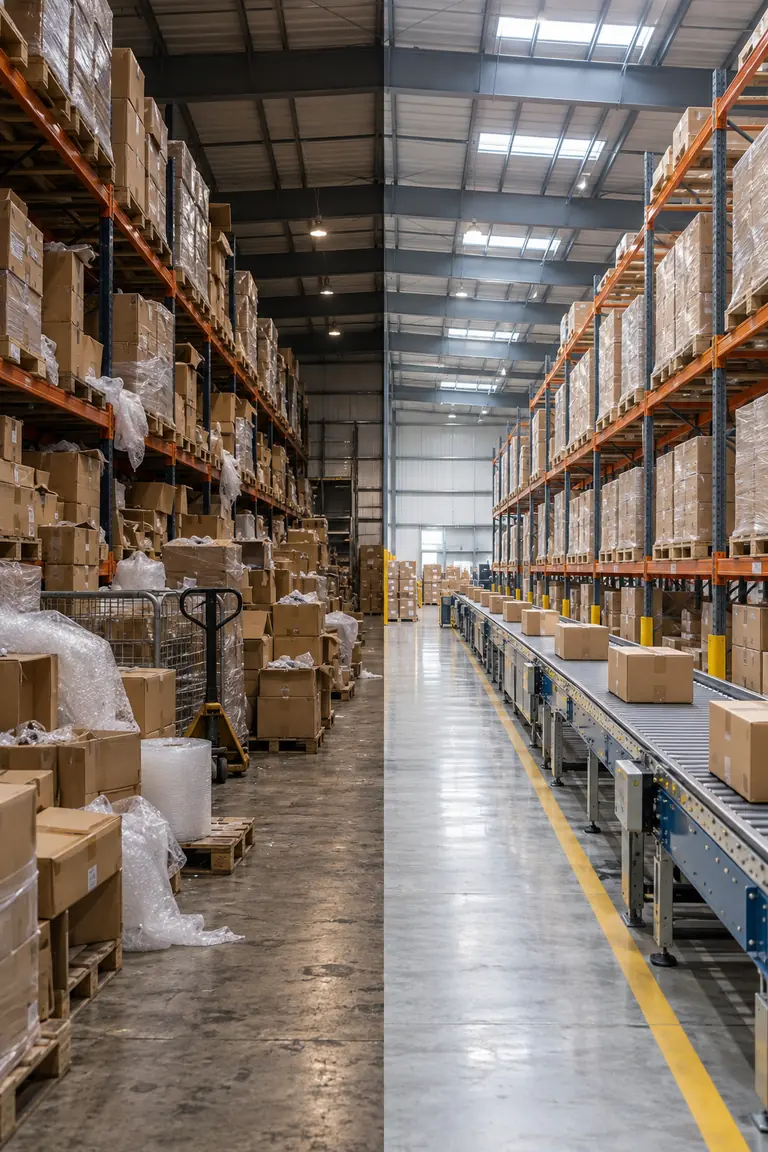
Two halves of a warehouse: a crowded manual workflow and an organized operation with shelving and a parcel conveyor

Orders on screen, but chaos still in the warehouse?

Your integration tool brings orders together; searching shelves, recalling wrong shipments and fixing stock by hand is still on you. Once your warehouse is connected, every order moves into preparation the moment it arrives and is tracked from shelf to carrier.

Every item is scanned and verified, so wrong items, missing items and mixed-up orders are caught before they reach the parcel.

Your warehouse. Your time.

How it differs from a typical integration tool

Both bring your orders onto one screen. The difference is what happens after the screen.

Typical integration tool

  • Shows the order; doesn’t know how it is prepared in the warehouse.
  • Stock is a number someone typed in.
  • Wrong items are noticed when the customer complains.
  • Invoices the whole order; doesn’t know a parcel shipped short.
  • Closes the return on screen; doesn’t know if the item went back on the shelf.
  • Sales, invoices and marketplace deductions sit on separate screens.

A warehouse connected to Fulfbase

  • Takes the order from the right shelf all the way to the carrier.
  • Stock is calculated from every movement in and out of the warehouse.
  • Wrong items are caught during packing.
  • Invoices match what is actually in the parcel.
  • Returns are checked and, if sound, go back on the shelf with stock updated.
  • Invoices, payouts and deductions come together on one pre-accounting screen.

An integration tool brings your orders to your screen. Fulfbase gets them out the door correctly.

Two sides, one panel

Your sales channels and your warehouse talk to each other in one system. A change on one side shows up on the other instantly.

Integration side

All orders in one panel
Orders from Trendyol, Hepsiburada, Amazon, Shopify, Temu and your own site in one list.
Live stock on every channel
When something sells on one channel, stock on the others updates on its own.
Product matching
Your marketplace listings are matched to warehouse products once, then it just runs.
Automatic e-invoicing on every marketplace
If your connected marketplace supports e-invoicing, your invoice is issued automatically as the parcel ships. The same flow on Trendyol, Hepsiburada and every other marketplace.
Pre-accounting support
Issued invoices, marketplace payouts and deductions such as commission, shipping and service fees on one screen. See sales and profit by order, and export records for your accountant.

Warehouse side

Shelf-addressed layout
Every item has a known place, so nobody asks “where is this?” again.
Labels and barcodes
Product and shelf labels are printed from the system; existing product barcodes can be used too.
Picking and packing by phone
Your team scans with the phones they already have; no special hardware required.
Returns and counts
Returns are checked and put back, counts are done shelf by shelf, and every stock movement is logged.

The same warehouse on Fulfbase Flow

Same warehouse, fewer staff, more orders

Fewer staff

Searching and double-checking disappear; a smaller team handles the same volume.

Lower cost

Mis-shipment, return and overtime costs go down. No major hardware investment required.

Faster dispatch

Every order enters preparation the moment it arrives, and ships sooner.

Don’t enter your products one by one

We plan the setup around how many products you have. For sellers with hundreds of variants, our team prepares the catalog.

A small catalog

Add your products in the panel yourself, with a step-by-step setup guide.

Products already on marketplaces

Your listings are imported and arrive already matched to your warehouse products.

Hundreds of variants

XML, Excel or your marketplace store: send whatever you have and we organize and prepare your products.

Live in 4 steps

  1. 1

    Intro call

    We learn about your sales channels, products and warehouse.

  2. 2

    Products and matching

    Your products are imported and matched to your marketplace listings.

  3. 3

    Layout and labels

    Your shelf structure is defined and product and shelf labels are prepared.

  4. 4

    Count and go live

    Stock is counted shelf by shelf, your team is trained, and we support the first orders.

Who is it for?

  • Sellers shipping to several marketplaces from their own warehouse
  • Wholesalers selling on marketplaces and to their dealers
  • Businesses facing stock, picking and shipping errors
  • Companies that don’t want to spend time and budget on a custom software project

Once your warehouse runs smoothly, turn spare capacity into revenue

With a connected warehouse you can apply to become a Fulfbase franchise partner and open your warehouse to other sellers.

Frequently asked questions

How is this different from a typical integration tool?

Integration tools bring orders onto one screen. Fulfbase does that, then manages the order in your warehouse until the right item is packed and shipped. Stock is calculated from real movements in the warehouse.

Which marketplaces can I connect?

Trendyol, Hepsiburada, Amazon, Shopify, Temu and independent online stores. New channels are added over time.

Do I have to give up my current invoicing software?

No. You can keep invoicing with the software you use today. Automatic invoicing is optional on every marketplace that supports e-invoicing.

What does pre-accounting support cover?

Your issued invoices, marketplace payouts and deductions such as commission, shipping and service fees, plus sales and profit reports by order, all in one panel. You can export records for your accountant. Official bookkeeping and tax filings stay with your accountant.

Do I have to enter my products one by one?

No. Products already on marketplaces can be imported. If you have hundreds of variants, send us your XML, Excel or store and we prepare your catalog.

Do I need special hardware?

No. Your team scans with their own phones. As volume grows you can move to handheld terminals and label printers if you wish.

How is it different from fulfillment?

With fulfillment you send your products to a Fulfbase warehouse and we run the operation. With Connect Your Warehouse, the warehouse, products and team are yours; Fulfbase provides the system and the setup.

How is pricing determined?

Pricing depends on your product range, order volume and setup scope. We share an itemised quote during the intro call, with no hidden fees.

Can my connected warehouse become a franchise?

Yes. Connected warehouses can apply to join the Fulfbase warehouse network as franchise partners and serve other sellers.

Don’t leave orders on the screen. Ship them.

Tell us about your channels and warehouse, and we’ll plan how to prepare your products and move you over.

No commitment · Setup support included · Transparent quote